

Mealie: recipes, meal plans and shopping lists on your own server
Mealie collects the recipes you actually cook into one searchable library, imports them straight from recipe websites, drops them onto a weekly meal plan, and turns that plan into a shopping list you can tick off on your phone. Self-hosted on your NAS, free, and shared with your household — no subscription recipe app required.
Published Nov 17, 2026 · Last updated Nov 18, 2026
Most households cook from a scattered mess: bookmarks on three browsers, screenshots in a photo library, a couple of paywalled apps, and the 6 p.m. question of what is for dinner answered from memory in a supermarket aisle. Mealie closes that loop. Save a recipe once, plan the week in minutes, and let the shopping list write itself. It is one of the lightest containers in this series — a single container with a built-in database — and one of the few that everyone in the house will actually open.
What Mealie does
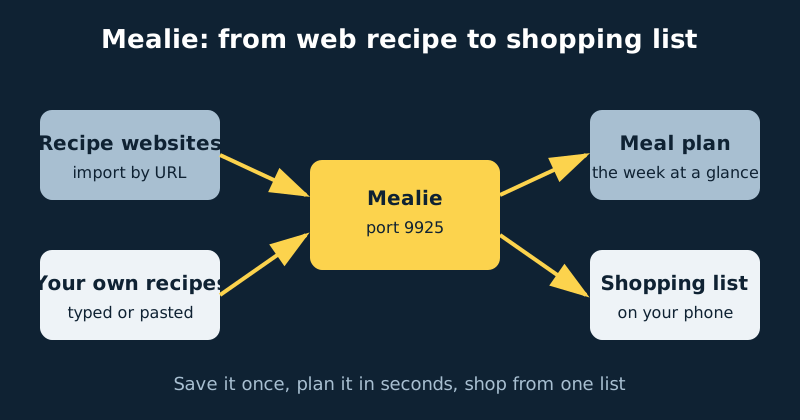
Mealie is three tools that feed each other. The recipe library stores each recipe with its photo, ingredients, steps, tags, categories and collections (“cookbooks”), all searchable — “everything tagged weeknight” is a two-second question. The importer is the magic trick: paste the URL of a recipe on almost any website and Mealie reads the structured recipe data those sites publish for search engines, saving a clean local copy — title, image, ingredients, method — that cannot vanish when the site redesigns or the recipe moves behind a paywall. The meal planner is a calendar you drag recipes onto, by day and by meal. And the shopping list generator reads a plan (or any hand-picked set of recipes), merges duplicate ingredients with their quantities added up, applies recipe scaling, and gives you a live checklist for the store. Underneath, Mealie’s groups and households system decides who shares which plans and lists, which matters more than it sounds — see the households section below.
What you need
- A NAS running Docker and Docker Compose. Mealie is genuinely light: for a household it uses its built-in SQLite database, so there is no separate database container to manage.
- One data folder on local storage. For this single-container SQLite deployment,
/app/datacontains the database and recipe files — back up that folder and you have the whole installation. (If you later configure an external PostgreSQL database instead, that database must be backed up separately.) - An account plan: one administrator (you), plus an account for each adult who plans meals or does the shopping.
- A way to reach it from the store if you want the live in-store checklist — a VPN-style connection or an HTTPS reverse proxy. At home on your own network it just works.
- A starter set of recipes you genuinely cook. Mealie gets useful at about a dozen imports, not at two hundred bookmarked someday-dishes.
Step-by-step installation
Before your first login: Mealie starts with temporary bootstrap credentials — email [email protected], password MyPassword — that are printed in its public documentation, which means anyone can know them. Never expose Mealie to the internet while those defaults are still active, and change them immediately at first login (step 4 below).
- Create the data folder — for example
/volume1/docker/mealie/data— on the NAS’s local storage. - Write the compose file from the example below and start it with
docker compose up -d. - Open the web interface at
http://your-nas-address:9925and log in with the default administrator account: email[email protected], passwordMyPassword. - Change those credentials immediately in your profile settings — set your real email address and a strong password. The defaults are printed in Mealie’s public documentation, which means everyone knows them.
- Create accounts for your household from the admin settings, and make sure everyone who plans or shops is in the same household, so the meal plan and shopping lists are shared (more on this below).
- Import your first recipe: choose Create › Import from URL, paste a recipe link from a site you cook from, and let Mealie pull it in.
- Clean up the import. Check the parsed ingredients and quantities — the importer is good, not perfect, and one odd line (“1 can tomatoes, drained and rinsed” parsed creatively) is normal. Fix it, add tags like weeknight or freezer-friendly, and set a category.
- Import a dozen favourites the same way. This is the unglamorous step that makes everything after it effortless.
- Plan the week: open the Meal Planner and drag recipes onto days. Add a plain text entry for leftovers night so the plan reflects reality.
- Generate the shopping list from the plan, open it on your phone, and tick something off — ideally in an actual shop.
- Add the data folder to your backups. Mealie also has a built-in backup and restore tool in the admin settings; either way,
/app/datais the crown jewels.
A concrete configuration example
services:
  mealie:
    image: ghcr.io/mealie-recipes/mealie:latest
    container_name: mealie
    environment:
      - TZ=Etc/UTC
    volumes:
      - /volume1/docker/mealie/data:/app/data
    ports:
      - "9925:9000"
    restart: unless-stopped
That really is the whole stack. Mealie listens on port 9000 inside the container, published here as 9925. The single volume holds the SQLite database and every recipe image, which is why backups are trivial. Setting TZ correctly matters more than it looks: meal-plan days and “today’s dinner” are date-sensitive. A PostgreSQL database is available as an option for very large multi-group installs, but for a household the built-in SQLite is the right default — one less container to feed.
Households, groups and who sees what
Mealie organises people in two layers, and ten minutes spent understanding them saves real confusion later. A group is the top level of the whole installation — most homes need exactly one, ever. Inside it, households are the people who plan and shop together. Meal plans and shopping lists belong to a household: everyone in the same household sees the same plan and the same list, updated live, while a different household’s plan is simply invisible to you. Recipes can be shared across the group or kept within a household, and every user still has their own account, favourites and preferences. The practical setup for almost every reader of this guide is boring on purpose: one group, one household, one account per adult. The classic beginner bug — “my partner can’t see the meal plan” — is two households where there should be one.
The weekly rhythm: plan, generate, shop
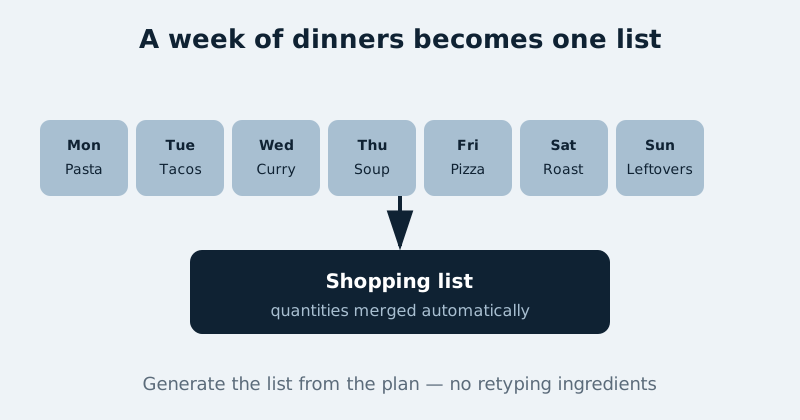
What makes Mealie stick is a ten-minute weekend loop. Pick the week’s recipes — your most-cooked list and the random-recipe dice are there for the uninspired evenings — and drag them onto days. Scale anything destined for leftovers up to 1.5x; the shopping list quantities follow the scaling automatically. Generate the list from the plan: ingredients merge across recipes, so three dishes needing onions produce one onion line with the total quantity, grouped sensibly for a trip around the store. In the shop, the list is a checklist on your phone, and because it lives on the server, anyone else in the household opening the same list sees what has already been ticked off — no more duplicate milk bought by two people in the same aisle. If you run Home Assistant, there is a Mealie integration that can put today’s meal plan and the shopping lists on a dashboard, which is a genuinely nice kitchen-tablet touch.
Common mistakes and troubleshooting
Still running on the default password
The default login is public knowledge. Change the admin email and password at first login, and if your instance is reachable beyond your home network, disable open registration as well so strangers cannot create accounts.
An import came out garbled — or failed completely
The site either does not publish clean structured recipe data or actively blocks scrapers. Most mainstream recipe sites import beautifully; for the stubborn ones, use Mealie’s create-from-text option (paste the recipe text and let it parse) or add the recipe manually. It is a per-site quirk, not a broken install.
Your partner sees a different meal plan and a different list
You are in different households. Plans and lists never cross household boundaries — check both accounts’ household membership in the admin settings and put everyone who shares dinners in the same one.
The shopping list quantities look doubled
The generator faithfully sums whatever the plan says: a recipe added twice, or scaled to 2x for guests, produces doubled ingredients. Fix the plan, regenerate the list, and the numbers behave.
Mealie “lost” every recipe after a container rebuild
It did not lose anything — the new container is simply looking at a different (empty) data folder. All of Mealie lives in the /app/data volume; the container itself is disposable. Point the volume back at your real data folder and everything returns.
Official documentation and references
- Mealie documentation — the official docs home
- Mealie documentation — the installation checklist
- Mealie on GitHub — release notes to check before upgrading
Frequently asked questions
Can Mealie import from any recipe website?
From most of them. The big recipe sites all publish the standard structured data Mealie reads, and those imports are close to perfect. Small blogs usually work too. Sites that block automated readers or use unusual layouts can fail — for those, create-from-text or manual entry is the fallback, and the recipe only has to be rescued once.
Is there a phone app?
Mealie is a fast, mobile-friendly web app rather than an app-store app: open it in your phone’s browser and add it to your home screen, and it behaves like one. For a shopping list you tick off in a store, that is genuinely all you need.
Can two people really share one plan and one list?
Yes — that is the household system working as designed. Separate accounts, one household: both of you see the same week, the same list, and each other’s ticks appearing on it. It ends the “did you get eggs?” text message as a genre.