

Frigate NVR: Local AI Camera Detection with Home Assistant
Updated for Frigate 0.18 (Nov 2026): Frigate's hardware guidance has changed — the Coral is no longer the recommended detector for new installs (the EdgeTPU platform is a dead end; OpenVINO on a modern Intel iGPU or a Hailo accelerator is the current advice). If you already own a Coral it keeps working and this guide still documents it — but do not buy one on old advice. See our Frigate 0.18 guide for the full picture.
Frigate is an open-source network video recorder that watches your camera streams on your own hardware, detects people, vehicles and animals locally, and records only what matters. Paired with Home Assistant it replaces cloud camera subscriptions with fast, private alerts — a person at the porch in seconds, not a generic motion ping minutes later.
Published Nov 17, 2026 · Last updated Nov 18, 2026
What you need
You need cameras that provide an RTSP stream — most wired IP cameras and many Wi-Fi models do — plus a small always-on computer to run Frigate in Docker, and storage for recordings. The critical purchase is the detector hardware. As of November 2026, Frigate's own documentation no longer recommends the Google Coral Edge TPU for new installs, because its upstream Linux drivers are unmaintained; existing Coral owners can keep using theirs happily. For a new build, use OpenVINO on a recent Intel integrated GPU if your host has one — it costs nothing extra — or a Hailo-8 or Hailo-8L accelerator for a dedicated low-power box. CPU-only detection is supported but only realistic for one or two cameras. You also need the Frigate integration in Home Assistant, installed through HACS or the integration store your setup uses, and ideally the Frigate card for your dashboards. Finally, plan your storage: event-based recording uses a fraction of the space of continuous recording, but a busy street-facing camera still generates far more than a quiet garden camera.
Plan streams, zones and retention first
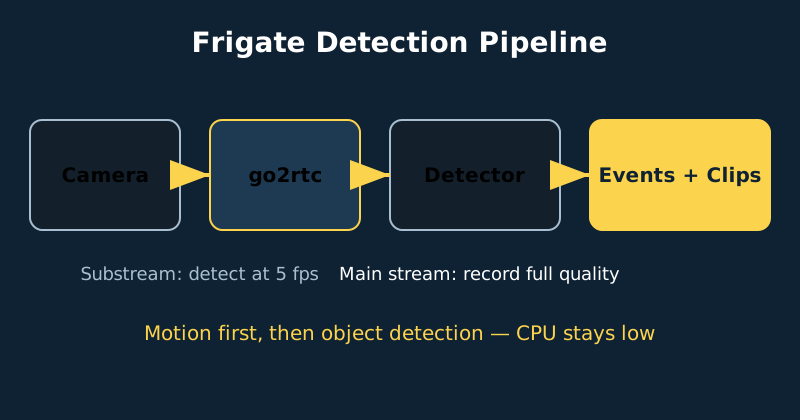
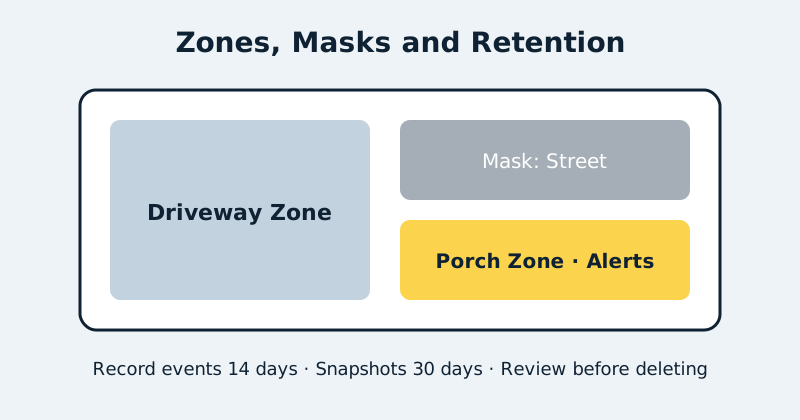
Frigate works best when each camera provides two streams. The substream, typically 640×360 or similar, feeds detection at five frames per second by default — enough to catch a walking person, cheap enough to run all day. The main stream feeds recording at full resolution, so your evidence clips stay sharp. go2rtc, which is built into Frigate, restreams camera feeds efficiently to Home Assistant and to the Frigate interface, so multiple viewers do not open multiple connections to a struggling camera. Before you write any configuration, sketch each camera's view and decide your zones: a driveway zone where vehicles matter, a porch zone where people trigger alerts, and masks over the public street and swaying trees so they never start detection at all. Decide retention at the same time — for example fourteen days for events and a shorter window for continuous segments — because retention, not camera count, is what fills disks.
Install and configure Frigate
- Prepare the host. Install Docker, create folders for Frigate's configuration, database and media, and make sure your detector device is visible to the container — an Intel GPU, Hailo module or existing Coral passed through correctly.
- Write a minimal configuration. Start with one camera, the detector block and the go2rtc stream definitions from the example below. Resist adding every camera at once; one working camera proves your stream URLs, detector and storage in a single test.
- Start Frigate and check the logs. Open the Frigate web interface, confirm the camera image is live, and watch the detector inference time. Tens of milliseconds is healthy; hundreds means the detector is not actually being used.
- Walk-test detection. Walk through the view at normal speed, near and far. Check the Events view: you should get a tracked person with a snapshot, not a storm of motion events from shadows.
- Add zones, masks and objects. Draw the zones you planned, mask the street and vegetation, and limit each zone to the object types that matter there — people on the porch, vehicles in the driveway.
- Set recording and retention. Enable event recording, choose your retention days per category, and confirm the media folder is filling and pruning as expected over the next day or two.
- Connect Home Assistant. Make sure the MQTT broker in the config below is running and that Home Assistant is connected to the same broker (the Mosquitto add-on on HAOS, or a Mosquitto container alongside Frigate). The Frigate integration depends on MQTT — it discovers Frigate and receives its events through the broker, and many of its entities simply never appear without it. Add the Frigate integration, confirm camera entities and event sensors appear, then build one good automation — porch person after dark turns on the porch light and sends a snapshot notification — before adding more.
mqtt:
  # Required for the Home Assistant integration: Frigate and Home
  # Assistant must share one MQTT broker. Point this at yours.
  enabled: true
  host: 192.168.1.10
  port: 1883
  user: frigate
  password: your-broker-password
  topic_prefix: frigate

detectors:
  # Intel GPU example (OpenVINO). The model block is required —
  # without it the detector will not start.
  ov:
    type: openvino
    device: GPU
    model:
      width: 320
      height: 320
      input_tensor: nhwc
      input_pixel_format: bgr
      path: /openvino-model/ssdlite_mobilenet_v2.xml
      labelmap_path: /openvino-model/coco_91cl_bkgr.txt

go2rtc:
  streams:
    porch:
      - rtsp://user:[email protected]:554/main
      - "ffmpeg:porch#audio=opus"
    porch_sub:
      - rtsp://user:[email protected]:554/sub

cameras:
  porch:
    ffmpeg:
      inputs:
        - path: rtsp://127.0.0.1:8554/porch
          roles: [record]
        - path: rtsp://127.0.0.1:8554/porch_sub
          roles: [detect]
    detect:
      width: 640
      height: 360
      fps: 5
    record:
      enabled: true
      retain:
        days: 3
      events:
        retain:
          default: 14
    zones:
      porch_steps:
        coordinates: 0.2,0.5,0.8,0.5,0.8,1,0.2,1
        objects: [person]
Two notes on that config. First, MQTT is not optional if you want the Home Assistant integration: leave it enabled and keep Frigate and Home Assistant on the same broker — disabling it gives you a standalone Frigate with no integration entities. Second, the detector block assumes a supported Intel GPU (device: GPU). On a machine without one, change it to device: CPU — detection will be slower and realistic for only a camera or two, but everything else in the config works unchanged.
Frigate+ is an optional paid service from the Frigate project that trains detection models on images you submit from your own cameras, which can noticeably improve tricky views such as infrared night footage. It is an enhancement, not a requirement: the built-in models are genuinely good, and no video needs to leave your house to use Frigate itself. Treat Frigate+ as a later upgrade if one camera keeps missing or mislabelling objects after your zones and masks are right.
Tuning without the alert fatigue
Most Frigate frustration is tuning, not software. If you get too many false events, raise the zone's object threshold slightly, check that a mask covers the moving tree or flag, and confirm detection is running on the substream — a misconfigured full-resolution detect stream both overloads the host and changes how objects are sized. If you miss events, lower the minimum score cautiously, verify the person is large enough in the substream at the far end of the view, and consider a camera angle change: a camera looking along a path detects far better than one watching people walk straight toward it from a distance. Review the Events page weekly for the first month and adjust one thing at a time, or you will never know which change helped.
Common mistakes and troubleshooting
The classic mistake is detecting on the main stream, which exhausts CPU and detector capacity and still records no better evidence. The second is pointing an unmasked camera at a public road and blaming the model for vehicle alerts — mask it or zone it. If Frigate starts but shows a black image, test the RTSP URL in a desktop player first; wrong substream paths are common and camera makers document them poorly. If inference times are huge, the container is probably falling back to CPU because the accelerator was not passed through — check the startup logs for the detector name you configured. If storage fills early, audit retention per camera rather than globally; one busy camera usually explains it. And keep Frigate, go2rtc and Home Assistant on the same local network segment as the cameras where possible, with camera internet access blocked at the router if your cameras support local-only operation.
Official documentation and references
- Frigate documentation — configuration reference and hardware guidance
- Frigate documentation — Home Assistant integration
- Frigate documentation — object detector options
- Home Assistant — MQTT integration documentation
FAQ
Do I still need a Coral TPU in 2026?
No. Frigate's documentation no longer recommends Coral for new installations because its drivers are unmaintained upstream. Use OpenVINO on an Intel iGPU you already own, or a Hailo accelerator for a new dedicated build. A Coral you already own remains supported and works fine.
Can Frigate replace my camera subscription completely?
For recording, detection and alerts, yes — that is its purpose, and it runs entirely locally. What you give up is a vendor's off-site cloud backup; if that matters, back up important event clips to a second local device or an encrypted backup you control.
How many cameras can one small computer handle?
It depends mainly on the detector, not the CPU. A modern Intel iGPU with OpenVINO or a Hailo-8L comfortably handles a typical handful of home cameras detecting at five frames per second on substreams. Recording many high-bitrate main streams is a disk and network question more than a detection one.
Related guides
- Cameras with Local Recording and No Subscription
- Actionable Notifications in Home Assistant
- Self-Hosting with Docker on a NAS
- Monitoring Your Services with Uptime Kuma
Planning drive space? Run your camera count through the NVR storage calculator — or, for Frigate specifically, the Frigate planner, which also validates your config and computes shm_size — it turns resolution, motion and retention days into the drive size you need.
Gear for this build
Prices are editorial and change often; buttons show live prices. Some links may earn a commission at no cost to you — see the disclosure page.
Detection eating your CPU? Offload it: Frigate with a Coral TPU in Docker.
Drowning in events? Zones & masks will quiet it down.