

Presence Detection That Works: Person Tracking Without False Alarms
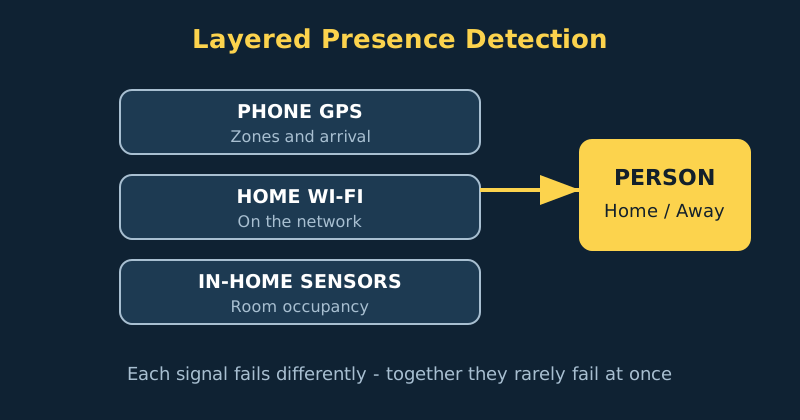
Presence detection fails in a memorable way: the lights turn off on a guest, the alarm arms while someone is in the shower, or the house cheerfully announces an arrival at 3 am because a phone briefly lost GPS. The fix is not a better single tracker. It is layering several imperfect signals — phone location, home network connection, and in-home sensors — so their mistakes do not line up, and being deliberately slow to declare someone away.
Published Nov 17, 2026 · Last updated Nov 18, 2026
The golden rule of presence: arriving can be fast, but leaving must be slow. A false “away” triggers the worst automations — alarms arming, heating shutting down, lights cutting out. A slow “away”, confirmed over ten or fifteen minutes by more than one signal, costs almost nothing.
What you need
- A phone per person with the Home Assistant companion app installed, signed in, and given the location permissions the app requests — this is your primary tracker.
- A person entity per household member — set these up under Settings, then People, so automations refer to people rather than to individual devices.
- A second signal — your router's device tracker integration, or a Bluetooth or network presence method, so a phone with a flat battery does not make its owner vanish.
- Zones set honestly — a home zone sized to your property, plus work or school zones only if you will actually automate on them.
Step-by-step: build reliable presence
- Create people before trackers. Under Settings, then People, add each household member and a guest “person” if you host often. Person entities are the stable interface your automations should use. Devices come and go — a new phone next year should mean updating one person entity, not editing twenty automations.
- Set up the companion app properly on each phone. Install the app, sign in, and enable the location and background sensors it offers, including location zone and geolocation where available. Then check the phone's own settings: the app needs location permission set to always, and precise location on. After that the platforms diverge. On Android, exempt the companion app from battery optimisation — most “presence does not work” reports end here, with the phone quietly killing the app to save battery. On iPhone there is no equivalent battery-optimisation setting; instead confirm Location is set to Always for the app and that Background App Refresh is switched on.
- Size the home zone to reality. Edit the home zone under Settings, then Areas, locations and zones. A radius that is too small makes phones flicker between home and away while sitting on the sofa, because GPS wanders by tens of metres indoors. A radius around your property plus a margin — often 100 metres or so — is stable without swallowing the neighbours or the corner shop.
- Attach a second tracker to each person. Add your router's integration so Home Assistant knows when each phone joins the home Wi-Fi, and assign that device tracker to the same person entity alongside the phone's GPS tracker. Home Assistant treats a person as home if any attached tracker reports home, which is exactly the bias you want: several ways to be home, and away only when every signal agrees for a while.
- Add a deliberate away delay in your automations. When an automation reacts to someone leaving, use a state trigger with a duration — the person must be not_home for ten minutes before the action runs. This single setting greatly reduces false-away events caused by brief tracking interruptions — a phone rebooting, a GPS glitch, or a quick trip into a coverage dead spot at the end of the street. It cannot cover everything (a router integration failing, or someone home without a tracked phone), which is why the layers above it matter.
- Handle the whole-house question separately. “Everyone is away” is a different, higher-stakes fact than any one person's state, and it deserves its own logic: every person not_home for fifteen minutes, ideally confirmed by no motion in the house. Build it as a template binary sensor or a group-based helper once, name it clearly, and let alarm, heating and away-mode automations all read that one sensor instead of each re-deciding.
- Add room presence only where it earns its keep. Motion sensors are occupancy, not identity — fine for lights, wrong for security decisions. Millimetre-wave presence sensors hold a room as occupied while someone sits still, which fixes the classic “lights off on a reader” problem in offices and living rooms. Bluetooth room tracking can follow a phone or watch between rooms, but treat it as a comfort feature, never as proof the house is empty.
- Live with it for a week before automating anything serious. Watch the person states on a dashboard for a few days. Note every wrong transition and its cause before you let presence arm an alarm or lock doors. Presence earns trust gradually — give it a probation period with harmless automations, such as notifications, before promoting it to security duty.
An “everyone away” sensor in YAML
This template binary sensor turns true only when both people have been away — and because automations will add their own delay on top, it stays calm through brief glitches. Adjust the person entities to your own, and add every household member to the check: leave one person out and the house can declare itself empty — and arm the alarm — while they are still home. Note the guest-mode condition on the automation below, too: away mode must never arm while guests are in the house (more on guest mode further down).
template:
  - binary_sensor:
      - name: "Everyone away"
        unique_id: everyone_away
        state: >-
          {{ is_state('person.person_one', 'not_home')
             and is_state('person.person_two', 'not_home') }}
        icon: >-
          {{ 'mdi:home-export-outline' if is_state(
             'binary_sensor.everyone_away', 'on')
             else 'mdi:home-account' }}

automation:
  - alias: "Away mode after everyone leaves"
    trigger:
      - platform: state
        entity_id: binary_sensor.everyone_away
        to: "on"
        for: "00:15:00"
    condition:
      - condition: state
        entity_id: input_boolean.guest_mode
        state: "off"
    action:
      - service: alarm_control_panel.alarm_arm_away
        target:
          entity_id: alarm_control_panel.home_alarm
      - service: climate.set_preset_mode
        target:
          entity_id: climate.main_thermostat
        data:
          preset_mode: away
    mode: single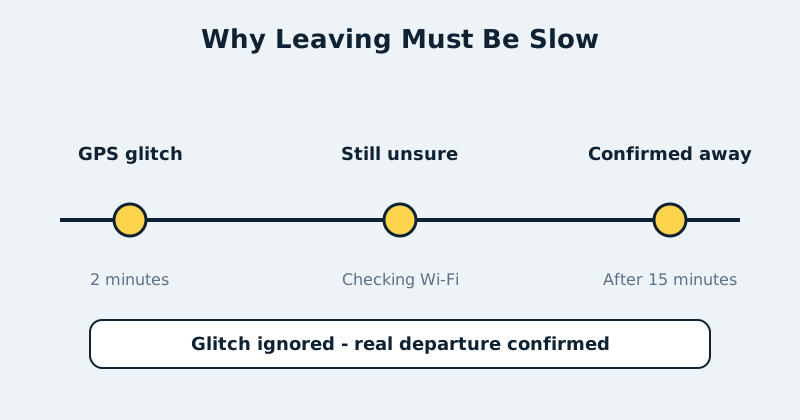
Guests, babysitters and borrowed phones
Every presence system meets its edge case at the front door: the guest with no tracker, the cleaner, the relative staying for a week. Solve this socially, not technically — a simple “guest mode” input boolean on the dashboard, switched on when visitors stay, that your away and alarm automations check as a condition. It takes ten seconds to explain, never runs out of battery, and prevents the single most embarrassing presence failure: the house deciding an occupied home is empty.
Common mistakes and troubleshooting
- Person flickers home and away at home. Almost always a too-small home zone or GPS drift indoors. Widen the zone, confirm precise location is enabled, and check that Wi-Fi-based location assistance is on in the phone settings.
- Arrival automations fire minutes late. The phone was rationing background location. Check battery optimisation exemptions first, then enable the companion app's high-accuracy mode triggered by entering the home zone's outer area, accepting the modest battery cost.
- Someone shows as away while their phone is charging at home. A second tracker fixes this — the router still sees the phone on Wi-Fi. If the router tracker also dropped, the phone likely disconnected in deep sleep; the away delay should have covered it, so lengthen the delay.
- Away mode triggered while a guest was inside. Guest mode was not on. Make guest mode visible on the main dashboard and add it as a condition to every away automation today, not after the next incident.
- Location history feels too sensitive to keep. Reasonable instinct. Shorten recorder retention for device tracker history, and remember the design goal: Home Assistant keeps this data on your own system, under your control, which is the privacy advantage over cloud-based presence services.
Official documentation and references
- Home Assistant — the Person integration and attaching trackers to people
- Home Assistant — device tracker entities and presence states
- Home Assistant — zones and zone-based triggers
- Home Assistant Companion — how phone location reporting works
FAQ
Which is better for presence: GPS or Wi-Fi tracking?
Neither alone — they answer different questions. GPS tells you where someone is in the world, which powers arrival automations and zones like work. Wi-Fi tells you a device is on the home network, which is fast and reliable indoors. Layered together on one person entity, they cover each other's blind spots.
Can presence detection work without phones?
Partially. Motion and mmWave sensors detect occupancy — someone is in this room — but not identity, and a quiet house with a sleeping occupant looks empty to them. For phone-free household members, a Bluetooth beacon on keys can help. But never let sensor-only logic make security decisions like arming an alarm.
Why does my phone report the wrong zone?
Usually zone size or overlapping zones. If home and a nearby zone overlap, the smaller or more specific zone can win unpredictably. Shrink overlaps, keep the home radius honest, and check the companion app's location log after a bad transition — it records what the phone actually sent, which settles most arguments.